
TW 2.0
Teamworks InnovationsSports
0.00.00 Reviews
- Version
- 1.11.17
- Installs
- 10.00K
- Age Rating
- Teen
Screenshots
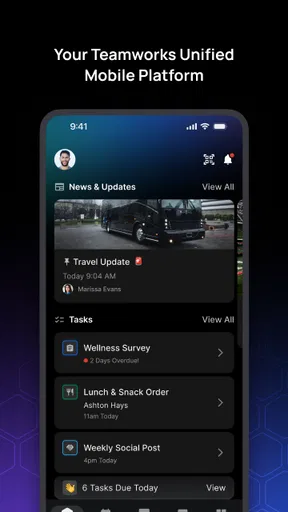
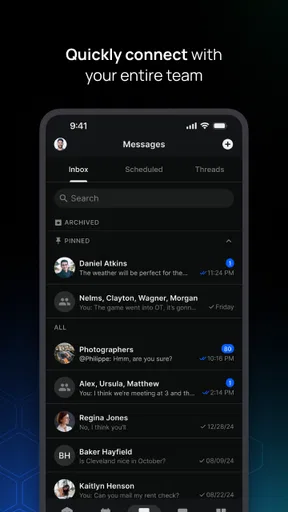
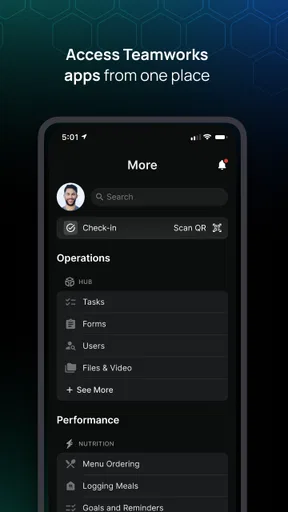
Our Review of TW 2.0
 Analysis by Appyee
TW 2.0 is a sports app from Teamworks Innovations that takes a more specialized approach than the usual fitness tracker or public score app. I spent time looking at it as a tool for people who live close to organized sport, and my main impression is that its value depends heavily on context. It feels aimed at an athletic environment rather than a casual user who simply wants to count steps or follow a match.
The app is free, carries a Teen content rating, and has passed the early adoption stage with over ten thousand installs. It was released on April 18, 2025, and version 1.11.17 is the current version I considered. Those details matter because this is a relatively young product, so I would approach it as an evolving sports platform rather than a fully familiar, long-established utility.
What makes TW 2.0 interesting is not a single obvious consumer feature. Its store summary, “Elite Sports Tech,” points toward a more serious sporting setting, while the short description simply calls it “TW 2.0.” In practice, that creates a different question from “Does it have enough workouts?” The better question is whether its presentation and workflow fit the way you receive sports-related information, especially when your attention, vision, hearing, movement, or surroundings are not ideal.
How the interface feels to read and navigate
My first test with a sports app is whether I can understand the screen quickly when I am in a hurry. TW 2.0 benefits from being treated as a focused tool rather than a general-purpose social feed. That focus can make the experience feel less distracting, particularly for someone who wants to get to a team or training-related area without wandering through unrelated content.
At the same time, a specialized sports app can be less immediately obvious than a mainstream exercise tracker. A new user may not know which area matters first, what information is expected from them, or whether a screen is meant for an athlete, coach, staff member, or another participant. I would recommend opening the app when you have a quiet moment and learning the basic route before relying on it during training. That small preparation can prevent unnecessary searching when your attention is already divided.
Readability is not only about font size. It also includes the order in which information appears, the distinction between primary and secondary actions, and whether labels make sense without extra explanation. In a sports setting, those details have practical consequences. A person checking information between drills needs a screen that can be understood in seconds, while someone reviewing details later may prefer more context. My experience suggests that TW 2.0 is best approached with a deliberate first setup rather than assumed to be self-explanatory from the first tap.
I also think about users who process information differently. Dense screens, unfamiliar terminology, or several similarly weighted controls can increase cognitive load even when the text itself is technically readable. A useful personal habit is to identify the few screens you will use most and treat them as your working route. That is more reliable than trying to remember every part of the app at once.
The current version, 1.11.17, is important here because interface behavior can change as a product develops. If a familiar control moves after an update, users who depend on a fixed routine may need a short adjustment period. I would not call that a reason to avoid the app, but it is a reason for coaches, parents, and athletes to leave room for orientation instead of introducing it immediately before an important session.
Useful navigation habits for real sports settings
One non-obvious strength of a focused app like this is that it can become easier to use when you build a personal routine around it. I would check the app before leaving for training, note the information I actually need, and avoid opening it repeatedly while moving between activities. This reduces the chance of making a rushed selection or missing a relevant update because I am looking at the screen while walking.
For a team environment, I would also encourage a shared explanation of the main route. If one person describes where to find the important information in everyday language, that can help users who are less comfortable with digital interfaces. The app itself does not need to be identical for every person; the surrounding routine can make it much more approachable.
That approach also reveals a limitation. TW 2.0 is not automatically accessible simply because it is specialized. A narrow purpose can reduce clutter, but it can also leave less room for users who need extra explanation or a slower introduction. The best experience is likely to come when the app is paired with clear human guidance.
Motor, visual, hearing, and sensory considerations
Sports technology is often used while standing, walking, carrying equipment, or wearing clothing that makes precise tapping less comfortable. That changes how I judge the app. A control that feels easy at a desk may be awkward when someone is holding a water bottle, wearing gloves, or trying to use one hand between activities.
I would therefore avoid treating TW 2.0 as a tool that should always be operated in motion. For users with limited dexterity, tremor, reduced reach, or fatigue, the safest workflow is to complete important tasks before practice or with the phone supported on a stable surface. That is not a criticism unique to this app; it is a sensible boundary for any sports application that may contain information a person does not want to enter incorrectly.
Visual access deserves the same practical attention. Bright outdoor light, glare, sweat, and a moving environment can make small interface details harder to distinguish. Someone with low vision may need to enlarge system text, increase contrast through device settings, or ask another person to confirm a selection. Those adjustments can help, but they also show why an app should not be judged only in a quiet indoor setting.
I would be cautious about assuming that every visual need is solved by the phone’s accessibility settings. System magnification can enlarge content, but it may also force more scrolling or make it harder to see the surrounding context. A person who relies on a screen reader should test the important route personally, because a control’s label and reading order matter just as much as its visible appearance. I cannot responsibly describe TW 2.0 as having a particular accessibility certification or a guaranteed assistive-technology experience, so individual testing is the right standard.
Hearing-related access is another area where context matters. If the app presents information visually, that can be useful for someone who cannot depend on audio. If a user expects alerts, spoken guidance, or sound to carry important meaning, they should verify how the app behaves on their own device rather than assuming that every notification will be available in an equivalent visual form.
Sensory load can also come from the environment rather than the app. A busy locker room, loud gym, crowded stadium, or fast-moving practice makes it harder to concentrate on any screen. I found the most inclusive approach was to separate information gathering from physical activity whenever possible. Reviewing the app in a calm place gives users more control over pace, lighting, and attention.
Where the app can fit different abilities
TW 2.0 may suit an athlete who prefers digital information to paper notes, a coach who wants a consistent team workflow, or a family member helping a younger user stay organized. It can also work for someone who needs to review information privately and at their own pace instead of asking for verbal instructions every time.
That flexibility has a trade-off. A person who needs large, simple controls and minimal decision-making may prefer a very basic sports calendar or a direct messaging tool. A person who wants detailed personal metrics may be happier with a dedicated training tracker. TW 2.0 makes more sense when the user’s sporting context is the priority and when the user can learn the app’s specific structure.
For motor or sensory differences, I would use a buddy system during the first few sessions. One person can operate the phone while the other confirms the information, then the user can decide which parts they are comfortable handling independently. This is more useful than assuming that one universal setting will suit everyone.
Access when the situation is less than ideal
The most realistic everyday scenario I can imagine is an athlete arriving at practice after a long school or workday. They are tired, the facility is noisy, the lighting is uneven, and they have only a short window to check what matters. In that situation, TW 2.0 is most helpful when the user already knows the route and is checking a small number of relevant items. It is less comfortable as a place to explore unfamiliar options while rushing through a doorway.
A second scenario involves a parent or guardian helping a teenager. The Teen rating is worth keeping in mind because the app is not positioned as a child-focused product. An adult may need to explain what the app is for, how it fits into the athlete’s routine, and when it is better to ask a coach or teammate rather than guess. That kind of support is especially important for users who are new to organized sports or who find unfamiliar digital systems stressful.
For coaches and staff, the key question is not simply whether the app works on a phone. It is whether everyone expected to use it can access the same information without being disadvantaged by speed, screen conditions, or unfamiliar terminology. A good team practice would be to provide a non-app explanation for essential information. That keeps the app from becoming the only route for someone who cannot comfortably use it at a particular moment.
Travel and changing connectivity can also affect any sports workflow, even before considering the app’s specific behavior. I would avoid making a last-minute plan that depends entirely on opening a screen at the exact moment it is needed. Save important details in an approved alternative, write down the critical time or location, or confirm the information with a teammate when appropriate. This is a sensible backup strategy rather than evidence of a particular technical limitation.
Another useful habit is to avoid phone use during activities where attention should remain on safety. A runner, cyclist, athlete carrying equipment, or person moving through a crowded venue should not be navigating a sports app at the same time. TW 2.0 is better used before the activity, during a planned pause, or afterward when the user can concentrate.
How it compares with familiar alternatives
Compared with a general fitness tracker, TW 2.0 feels like the better candidate for an organized sporting context and the weaker choice for someone who mainly wants steps, calorie estimates, sleep information, or a simple solo workout log. A mainstream tracker usually explains its purpose immediately because its audience is broad. This app asks the user to understand the sporting environment around it.
Compared with a basic calendar, TW 2.0 may be more relevant to a team or elite-sports routine, but a calendar remains easier for someone who only needs reminders and dates. Compared with group messaging, it may offer a more structured destination for sports-related information, while messaging is often faster for a one-off question. I would not replace every existing tool with it automatically. The right choice depends on whether you need a dedicated sports workflow or just communication.
That comparison also helps with inclusion. General-purpose apps often have mature device-level accessibility support because they serve a wide audience, while a specialized app may be more meaningful for a particular team but require more orientation. If a user’s main priority is guaranteed compatibility with a familiar assistive workflow, the established alternative may be the safer starting point. If the sporting context is central, TW 2.0 deserves a careful trial.
Remaining barriers and who should skip it
The biggest barrier is uncertainty about fit. “Elite Sports Tech” is a clear signal that this is not designed as a universal wellness companion, but it does not tell every new user exactly how the app will fit their role. Someone downloading it casually may find that the experience makes more sense only after joining the relevant sporting workflow.
I would also skip it if I wanted a complete personal fitness dashboard with familiar health metrics and a large library of independent workouts. That is not the problem this app appears to solve. I would choose a conventional fitness app for solo exercise planning, a calendar for simple scheduling, or a messaging service for quick conversations.
Users who need to operate every function without visual interaction should test their essential tasks before committing. The same applies to anyone who depends on very large touch targets, strong audio guidance, simplified language, or a fully predictable interface. I would not make assumptions based on the app’s sports focus alone. A specialized audience does not automatically mean every ability and access need has been covered.
There is also a social barrier. If teammates, coaches, or family members use different methods, one person may end up translating information between the app and another channel. That extra step can become tiring for users who already face communication or cognitive demands. Before adopting TW 2.0 across a group, I would agree on what information belongs there and what must remain available elsewhere.
Finally, the app’s relatively recent release means I would build feedback into the trial period. If a label is confusing, a route takes too many steps, or a user cannot comfortably complete an essential action, record the exact point of friction. Specific feedback is more useful than a general complaint that the app feels difficult, especially for a product that is still establishing its place in sports technology.
An inclusive verdict for TW 2.0
I see TW 2.0 as a focused sports app with the strongest potential for athletes, teams, and sport-adjacent users who need a dedicated digital environment rather than another generic fitness tool. The fact that it is free makes experimentation easier, and the work of Teamworks Innovations gives it a clear sports-oriented identity. Its current scale, with over ten thousand installs, suggests a product that is still finding its audience rather than an app that everyone already knows.
My recommendation is conditional but positive: try it when your sporting organization or routine gives it a clear purpose, and test the important screens under the conditions in which you will actually use them. Do not judge accessibility only at home with perfect lighting and unlimited time. Check readability outdoors, test navigation when distracted, consider one-handed use, and confirm that the information you need can be reached without unsafe phone handling.
The most inclusive way to adopt it is to treat the app as one part of a broader routine. Keep essential instructions understandable outside the screen, give new users time to learn the route, and allow alternatives for people who cannot use a phone comfortably at a particular moment. That approach supports different abilities without pretending that one interface can solve every access need.
In my view, TW 2.0 is worth trying when organized sport is the center of your digital workflow. It is not my first recommendation for casual fitness, simple reminders, or users seeking a universally familiar accessibility experience. For the right team or athlete, though, its focused purpose can be more useful than a crowded general app, provided the people using it are given enough time, context, and choice.
Verdict
Strengths of TW 2.0
- Simple interface makes core features easy to find.
- Runs smoothly on many older Android devices.
- Useful tools are available without lengthy setup.
- Clear navigation helps new users get started quickly.
- Regular updates can improve stability and compatibility.
Limitations of TW 2.0
- Some features may require an internet connection.
- The app may offer limited customization options.
- Older devices could experience occasional slowdowns.
- Privacy details should be reviewed before creating an account.
- Support options may be limited for troubleshooting issues.
Similar Picks in This Category
View All
BeSoccer: Soccer Live Score
BeSoccer apps4.3

Cricbuzz - Live Cricket Scores
Cricbuzz.com3.7

NFL
NFL Enterprises LLC2.4

Da Fit
MO YOUNG LIMITED3.6

ESPN
Disney4.5

LiveScore: Live Sports Scores
LiveScore Limited4.5
Frequently Asked Questions
What is TW 2.0, and what can I use it for?
TW 2.0 is an application designed to provide access to its core digital services through a mobile-friendly interface. Depending on the version and region, it may include tools for browsing content, managing an account, checking updates, or interacting with connected features. Before downloading, users should review the app description carefully because available functions can vary between Android and iOS and may depend on account access or location.
Is TW 2.0 free to download and use?
TW 2.0 may be available as a free download, but downloading the app does not always mean every feature is free. Some functions may require registration, subscriptions, in-app purchases, or access to a related service. We recommend checking the official store listing for current pricing, payment terms, and renewal conditions before installing. Users should also verify whether mobile data or other usage charges could apply while using the app.
What permissions does TW 2.0 require?
The permissions requested by TW 2.0 can depend on the device, operating system, and features you use. An app of this type may request access to notifications, storage, camera, microphone, location, or account information when those features are needed. Review each permission prompt instead of automatically accepting everything. If a request seems unrelated to the app’s purpose, you can deny it, although certain functions may then be unavailable.
Is TW 2.0 safe and reliable to install?
For the safest experience, download TW 2.0 only from its official Google Play Store or Apple App Store listing, and confirm the developer name, reviews, update history, and requested permissions. Avoid modified APK files or links from unknown websites, as they may contain unwanted software. App security can change with future updates, so keep your operating system updated and use a strong password if the application requires an account.
What should I do if TW 2.0 does not work correctly?
If TW 2.0 crashes, fails to load, or does not complete a login, first check your internet connection and make sure the app is updated to the latest version. Restarting the device or reinstalling the application may also help, but save any important account details before doing so. If the issue continues, consult the app’s official support channel and include your device model, operating-system version, and a clear description of the problem.
